
Your best gear for any fight.
Pick a target and build a loadout, or let RuneGlass find your best gear from your synced bank. See your DPS, max hit, accuracy and kill time before you leave the bank.
- 4.8 out of 5 (118 App Store ratings) (opens in a new tab)
- 6,000+ downloads
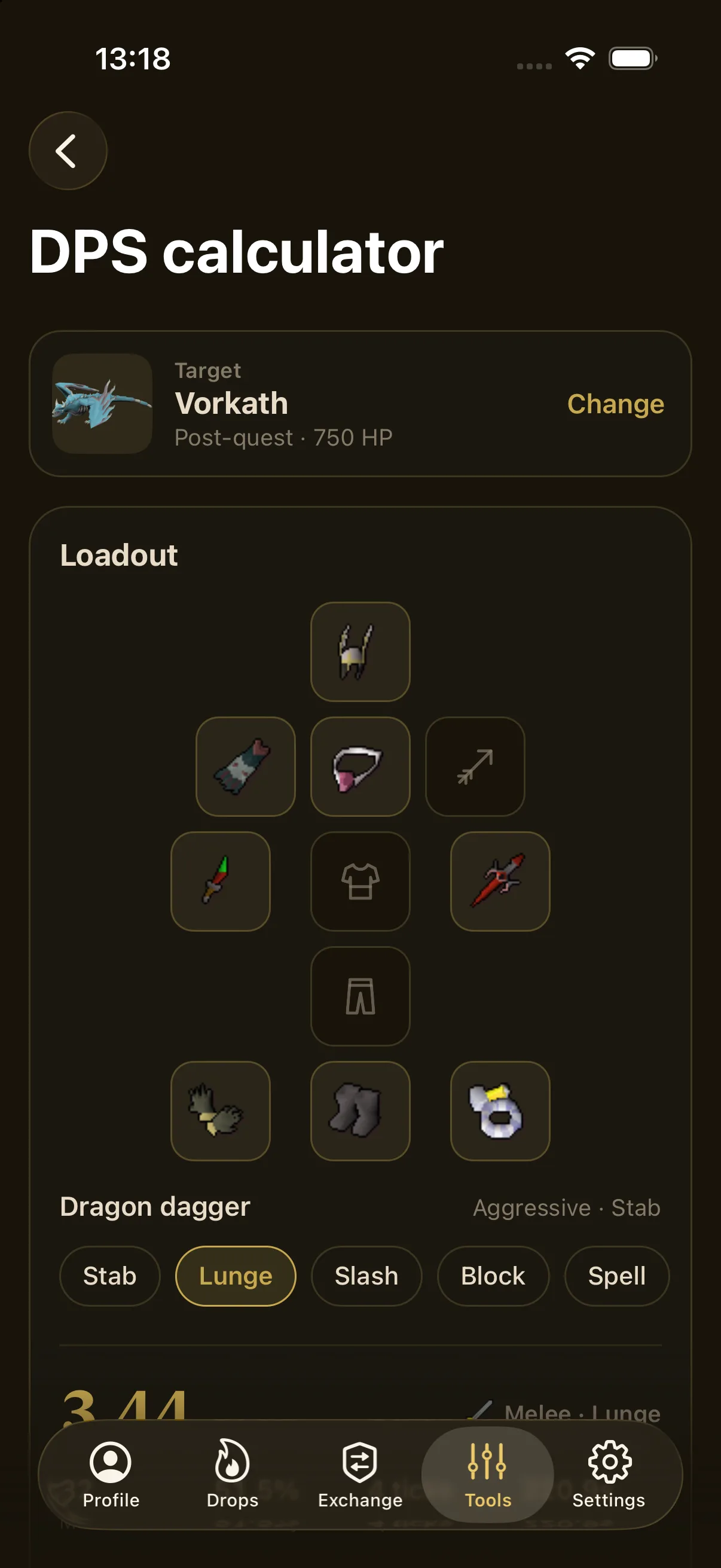
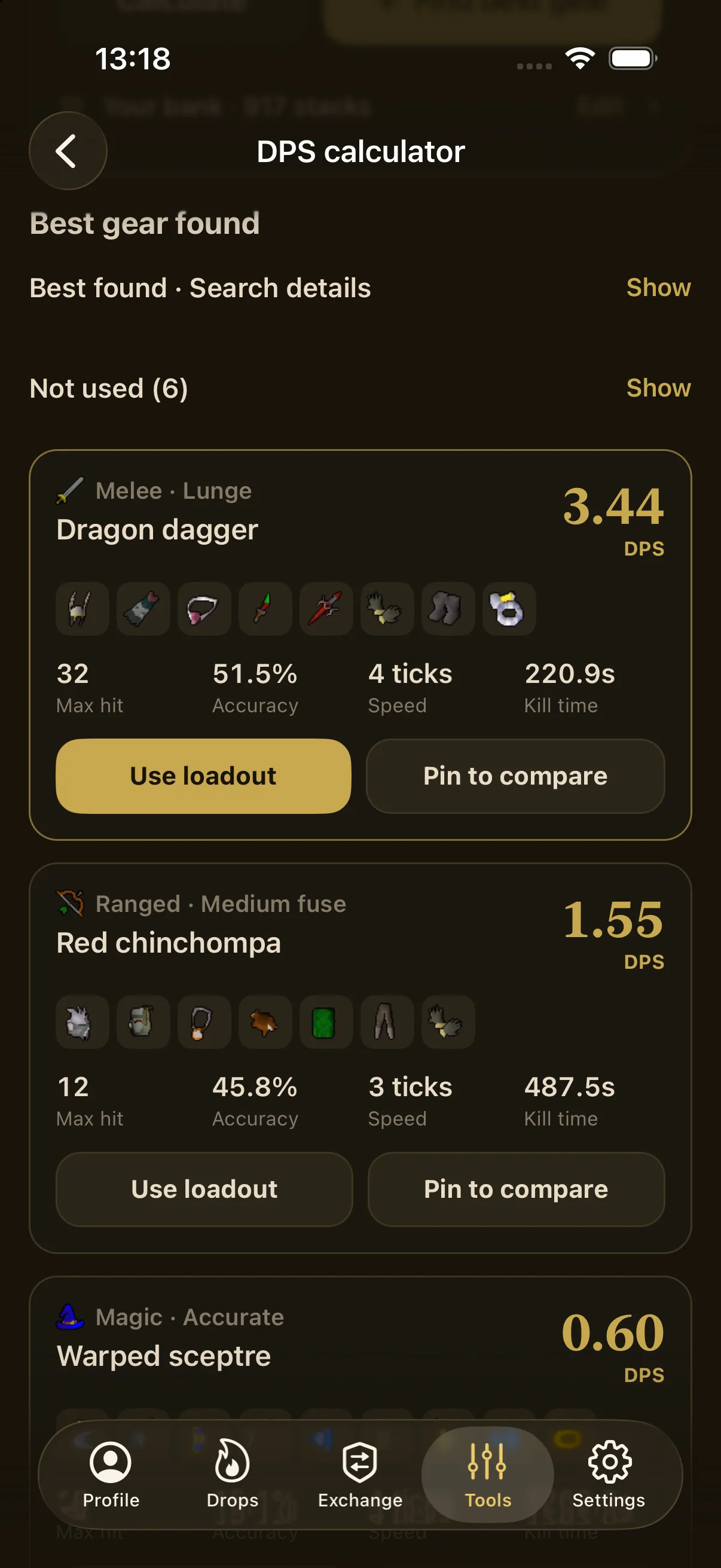
Build a loadout
Search 2,919 targets, including boss variants and phases, then fill the familiar OSRS equipment slots from 5,461 pieces of gear.
Pick your attack style and tap Calculate. RuneGlass shows your DPS with the numbers behind it.
- DPS, max hit, accuracy, attack speed and kill time.
- Combat settings for levels, potions, prayers, spells and encounter options.
- Slayer task, Wilderness and raid scaling options for the fights that use them.
Find best gear from your bank
Tap Find best gear and RuneGlass searches your synced bank for the highest DPS loadouts against your target. Each setup shows its gear and stats, ready to use in one tap.
The search follows the gear rules of the game, using your levels and your synced quest and diary progress.
- Searches your bank, or a list of items you choose.
- Leave items out of searches whenever you like.
- Search details show how many setups were checked.
Compare and save
Pin to compare
Pin a setup, change your gear and see the DPS difference side by side.
Saved setups
Save a target with its loadout and open it again whenever you need it.
Your levels
The calculator starts from your character’s levels, and you can edit them to plan ahead.
Find your best gear
Get RuneGlass
Download RuneGlass, sign in and link your character.
Sync your bank
Install the RuneGlass plugin from the Plugin Hub, turn on Enable RuneGlass sync, pair it with a code and open your bank in game.
Open in Plugin Hub (opens in a new tab)Pick a target
Open Tools › DPS calculator, choose a target and tap Find best gear.
DPS calculator questions
Do I need RuneLite?
Building a loadout and calculating its DPS works for every signed-in character. Syncing your bank with RuneLite lets Find best gear search the items you own.
How is DPS calculated?
RuneGlass uses the combat formulas of the OSRS Wiki DPS calculator and models continuous attacking. Kill times are modeled estimates.
How does Find best gear work?
It tries combinations of the gear in your synced bank against your target and lists the highest DPS setups it finds. For large banks it shows the best setup found, and tells you when a search covered every combination.
Can I save my setups?
Yes. Save a target with its loadout, and pin a setup to compare it with another.
Is my RuneScape account safe?
The RuneGlass plugin is on RuneLite’s Plugin Hub. It never sees your RuneScape login, never plays for you, and only syncs when you switch it on.
More in RuneGlass
Farming timers
Crop and bird house timers with ready alerts and widgets.
Drop tracker
Valuable drops saved as you play, with drop rates and luck.
RuneLite sync
Your skills, XP, drops, quests, bank, diaries and timers, synced as you play.
Your bank
Browse, search and sort your bank from your phone.
Achievement diaries
All 12 regions and 492 tasks, synced from RuneLite or ticked off yourself.

Your whole account, in your pocket.
Download on the App Store (opens in a new tab)- 4.8 out of 5 (118 App Store ratings) (opens in a new tab)
- 6,000+ downloads
Get RuneGlass updates.
 Made by Jeroen Breevoort, a long-time OSRS player.