
Know when your farm run is ready.
Every patch and bird house, timed on your phone. With RuneLite, timers fill themselves in as you check your patches, and RuneGlass alerts you when your run is ready.
- 4.8 out of 5 (118 App Store ratings) (opens in a new tab)
- 6,000+ downloads
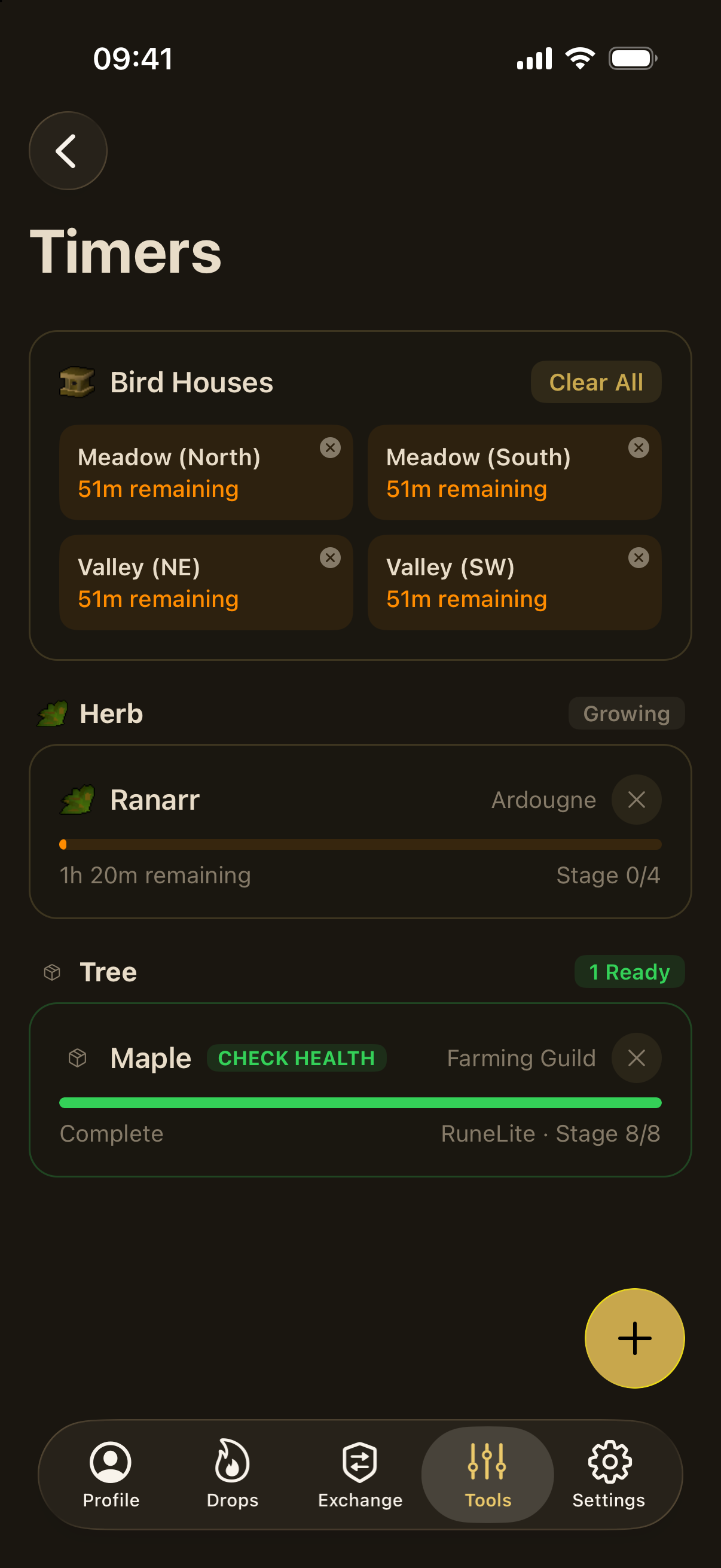
Timers that fill themselves in
With the RuneGlass plugin on, RuneLite reads each patch while you’re near it: what’s planted, how far it has grown and when it will be ready. RuneGlass turns that into a timer on your phone.
Bird houses on Fossil Island get a timer as soon as you fill them with seeds. Every patch type is covered.
- Herbs, allotments, flowers, bushes and hops.
- Trees and fruit trees, including spirit trees, redwoods, calquat and celastrus.
- Special patches such as Hespori, giant seaweed, cactus, mushrooms, grapes, anima seeds and coral.
- All four bird house spaces on Fossil Island, plus compost bins as timers you start yourself.
Alerts and widgets
Ready alerts
Turn on notifications once, and RuneGlass alerts you when a crop or bird house is ready. Bird houses that finish together share one alert.
Home Screen widgets
Small, medium and large widgets show your next timers with a live countdown, soonest first. Tap one to open Timers.
Lock Screen widget
See your next two timers without unlocking your phone.
Add timers in seconds
Playing on the official mobile app? Add a timer yourself: pick a category, a crop and a patch, and RuneGlass counts down from when you plant.
Timers you add work for every crop, compost bin and bird house. When RuneLite sees the same patch later, it takes over and keeps the timer up to date.
Set up farming timers
Get RuneGlass
Download RuneGlass, sign in and link your character.
Turn on sync in RuneLite
Install the RuneGlass plugin from the Plugin Hub, turn on Enable RuneGlass sync and pair it with a code.
Open in Plugin Hub (opens in a new tab)Do your farm run
Check your patches as usual, and timers appear as RuneLite sees each one. Turn on Notifications in RuneGlass Settings for ready alerts.
Farming timer questions
How are ready times worked out?
From the growth stage RuneLite last saw, or from when you planted for timers you add yourself. Each time RuneLite sees the patch again, the timer updates.
Do I need RuneLite?
RuneLite fills your timers in for you as you farm. You can also add timers yourself for any crop, compost bin or bird house.
How do I get ready alerts?
Turn on Notifications in RuneGlass Settings and allow them for RuneGlass in iOS Settings. Open RuneGlass after your farm run, and it sets an alert for every timer RuneLite added.
Can I see my timers on my Lock Screen?
Yes. The Lock Screen widget shows your next two timers, and Home Screen widgets come in small, medium and large.
Is my RuneScape account safe?
The RuneGlass plugin is on RuneLite’s Plugin Hub. It never sees your RuneScape login, never plays for you, and only syncs when you switch it on.
More in RuneGlass
Drop tracker
Valuable drops saved as you play, with drop rates and luck.
RuneLite sync
Your skills, XP, drops, quests, bank, diaries and timers, synced as you play.
Your bank
Browse, search and sort your bank from your phone.
Achievement diaries
All 12 regions and 492 tasks, synced from RuneLite or ticked off yourself.
DPS calculator
Pick a target, build a loadout or find your best gear from your bank.

Your whole account, in your pocket.
Download on the App Store (opens in a new tab)- 4.8 out of 5 (118 App Store ratings) (opens in a new tab)
- 6,000+ downloads
Get RuneGlass updates.
 Made by Jeroen Breevoort, a long-time OSRS player.